
best apps to stop scrolling in 2026 (blockers vs interrupters)
lodz · · updated

i need instagram, x and linkedin for work, so blocking them is not an option. that ruled out most of this category before i even started.
i should say up front that i built one of the apps on this list. it's called kokopi and i've put it first in its group, so read this knowing that. what i can promise is that the criteria are the same for all ten, i've named where each one beats mine, and everything about the other nine comes from their own listings, pricing pages and docs.
the short answer. if there's an app you'd happily lose, block it. if you need that app for work, a blocker will fail, because you will turn it off. pick something that interrupts you instead. and be careful with the ones that turn it into a game.
the 10 are ios screen time, screenzen, opal, unrot, freedom and brick, which block. one sec, clearspace and kokopi, which interrupt. and forest, which does neither.
quick picks
need the app for work?  kokopi or
  one sec
want a breath or push ups before the app?  clearspace
want the most polished hard block?  opal
opal
want screen time tied to a good habit?  unrot
unrot
want to spend nothing?  ios screen time first, then
  screenzen
scroll on a laptop too?  freedom
want timed focus at a desk?  forest
already beaten every software block?  brick
brick
how i judged them
the same five tests for all ten, mine included.
- does it survive an app you need for work. this one decides everything else. if switching it off is the only way to do your job, you will switch it off.
- what happens when you cross your limit. it blocks you, it interrupts you, or it makes you earn your way back in.
- is it a subscription. renting a tool that exists to give you time back is its own small annoyance.
- does it turn it into a game. coins, streaks, gems, pets. there's a section further down on why that bothers me.
- what it runs on. iphone, android, desktop, or a physical object you have to walk to.
the three things these apps actually do
a blocker cuts you off. you set a limit, you hit it, the app stops opening. it works when the app is something you'd happily lose. it stops working the moment the app is one you actually need, because you'll disable it, and then you'll leave it disabled.
an interrupter never takes the app away. it steps in and asks a question, and you can still say yes. the point isn't to stop you, it's to make you notice. doomscrolling happens on autopilot, and you can't decide to stop something you can't feel happening.
then there's a third thing, and it cuts across both. some of these apps are games. you earn coins, you collect gems, you keep a streak alive, you plant trees. four of the ten below work this way, and i think it's worth a section of its own further down, because it's most of the reason i ended up building something else.
the table
| app | price | blocks or interrupts | game mechanics | best for |
|---|---|---|---|---|
| kokopi | $9.99 once | interrupts | none | catching yourself scrolling |
| one sec | $19.99/yr | interrupts | none | catching yourself scrolling, on android or desktop |
| clearspace | free tier, $44.99/yr | interrupts | streaks, challenges | a breath or 10 push ups before the app |
| ios screen time | free | blocks | none | trying the one you already own |
| screenzen | free | blocks | none | free limits, with stats |
| opal | $99.99/yr | blocks | gems, score, leaderboard | a hard block, if you'll pay for the polish |
| unrot | $34.99/yr | blocks until you earn it | coins, streaks, a pet | tying screen time to a real habit |
| freedom | free tier, $39.99/yr | blocks | none | a hard block across phone and laptop |
| brick | $59 once | blocks | none | when every software block has failed |
| forest | free tier, $35.99/yr | neither | coins, trees | timed focus at a desk |
the interrupters
there are three apps in this category and i made one of them. read this section with that in mind.
kokopi
- price free for a week, then $9.99 once, no subscription
- platforms ios
- best for the apps you need every day, when you don't want another subscription and don't want another game
- get it kokopi on the app store
cross the limit on an app and koko, a small bird, shows up and asks you to close it or take more time. he has opinions about how long you ask for. two minutes gets "quick. respect." thirty gets "...". you take the time you asked for, then he comes back.
kokopi comes with stats on how many times koko showed up, and how many of those times you closed the app or took more time.
i built it after nine months on one sec. i wanted the interruption without a breathing exercise in front of it, without paying every year, and without a game bolted on. there are no streaks, no coins, no score, no leaderboard. there is nothing in it to collect.
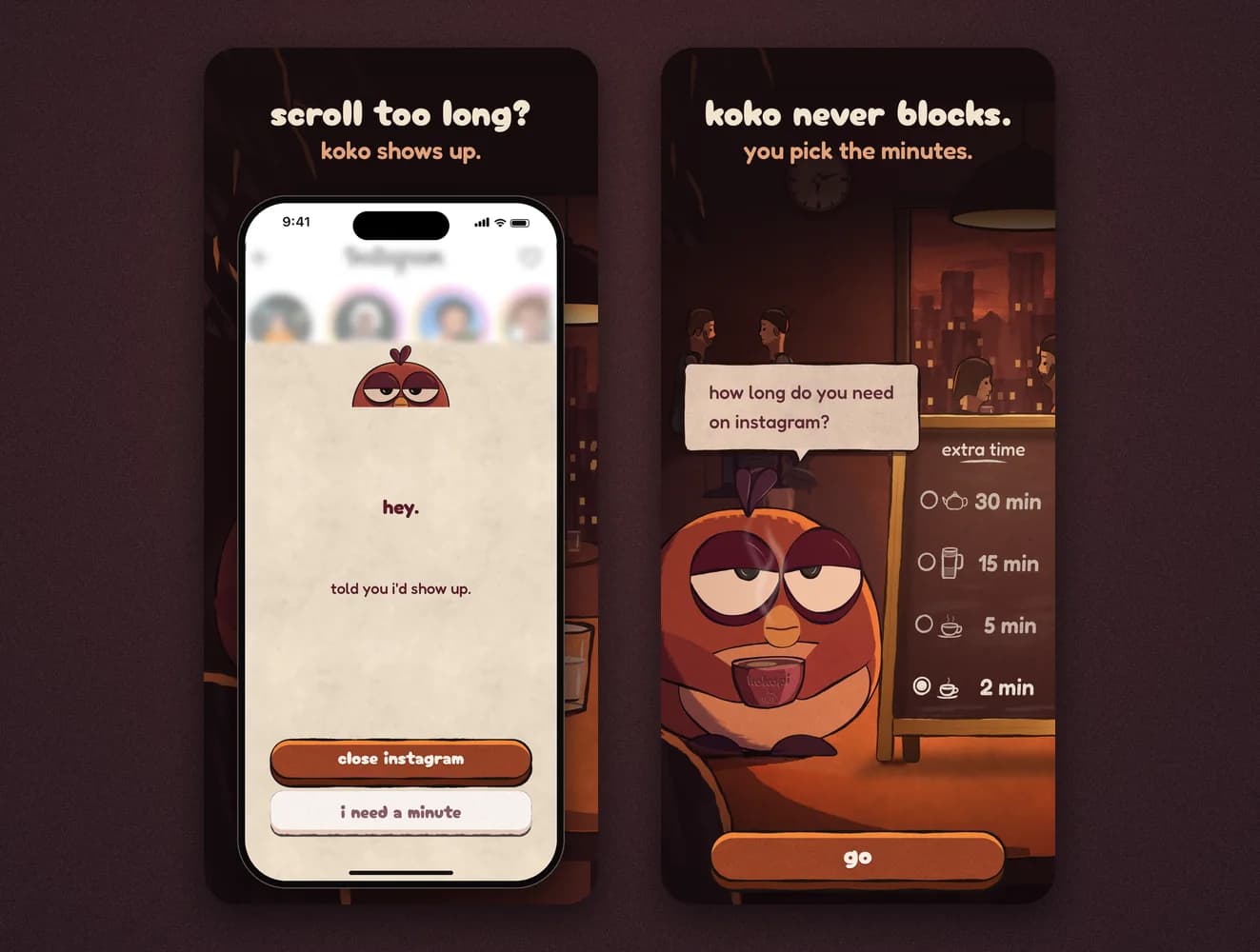
the catch ios only. if your scrolling happens on a laptop too, this doesn't touch that. and it will not stop you. if what you actually want is a wall in front of an app you never need for work, one of the blockers below will do that job better than kokopi ever will.
one sec
- price one monitored app free. $19.99 a year, or $99.99 once
- platforms ios, android, desktop
- best for android, desktop, or trying interruption before committing to anything
this is the app i used for nine months, and it saved me hours. i wrote about how i started using it separately.
it blocks you when you open an app and holds you in a breathing exercise. then it asks whether you still want to go in. the breathing is swappable: you can have a math problem instead, or rotate your phone, or a reminder of something better you could do, or your own face on the screen.
it can also, like kokopi, fire the interruption a set number of minutes after you open the app rather than on the way in, and repeat it while you're still there. intention tracking makes you say what you're going in for before it lets you through. there are also time limits, website blocking and emotion tracking.
it comes with stats on how many times the interruption fired.
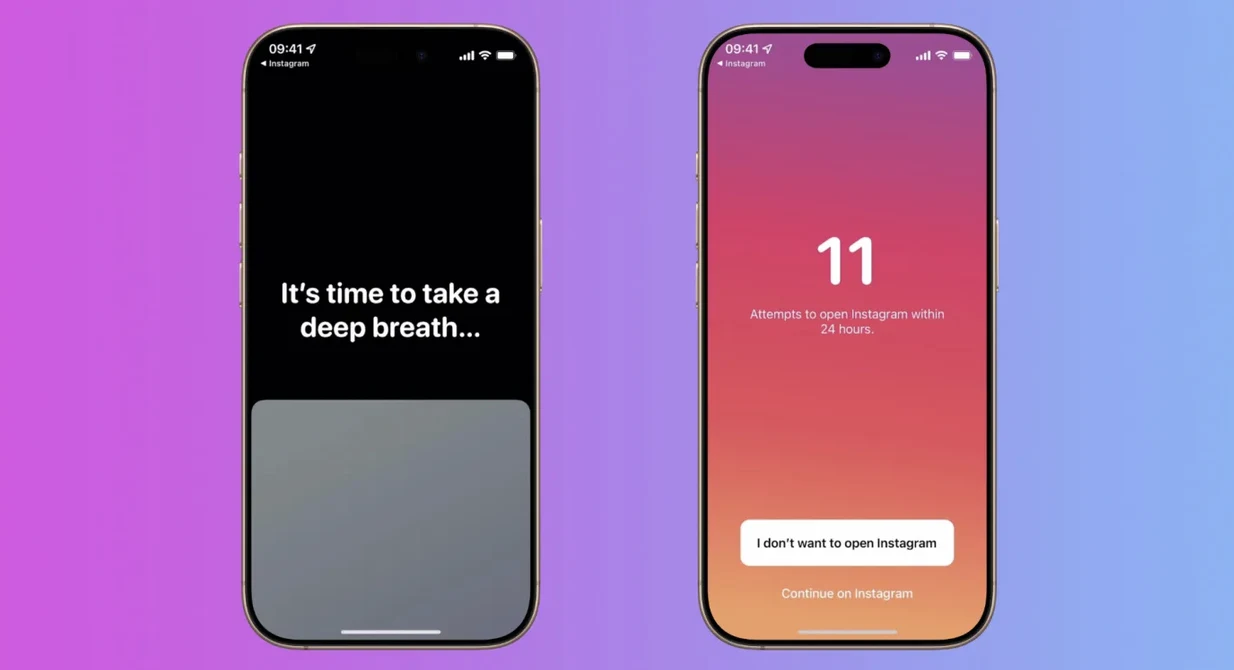
the catch two. the breathing worked on me for a few weeks, then i started clicking straight through it because i was frustrated that i couldn't get back to the content quickly. and the price. one app free, then $19.99 a year, or $99.99 once. that number is part of why kokopi is $9.99.
clearspace
- price free tier. premium is $6.99 a month or $44.99 a year
- platforms ios, android, a chrome extension
- best for a breath or 10 push ups before the app, with challenges on top
open an app you picked and clearspace puts a challenge in front of it. it can be a short centering exercise, a deep breath with a quote on the screen. or you have to move. 10 push ups, squats, steps or jump rope. then you leave, or you say how long you want to stay. when that time runs out, it takes you out of the app.
there's also a limit on how many times a day you open each app, focus sessions, a streak, and challenges you can join with friends.
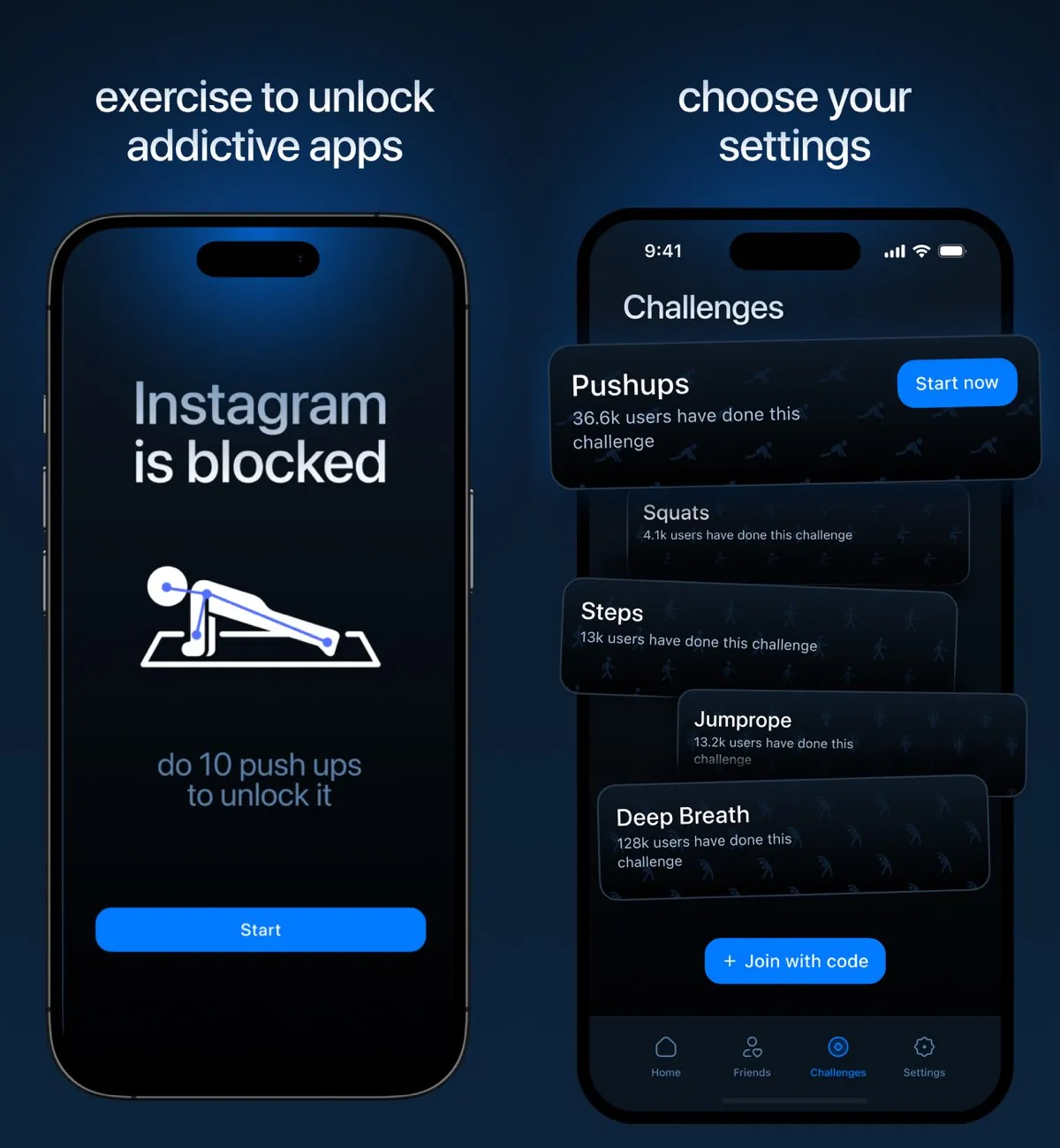
the catch two. when the time you picked runs out, it takes the app away, even in the middle of work. for an app you need at work, that's the moment you switch it off. and the streaks and challenges make it one of the games, which i come back to below.
the blockers
ios screen time
- price free, already on your phone
- platforms ios
- best for finding out whether a plain limit is enough before you pay for anything
app limits, category limits, downtime, and an always-allowed list. hit a limit and you get three buttons: one more minute, remind me in 15 minutes, or ignore limit for today.
if you set a screen time passcode and turn on "block at end of limit", the ignore button is replaced by "ask for more time". that turns it into a genuinely strict block. start here, seriously. a lot of people buy an app before trying the one they already own.
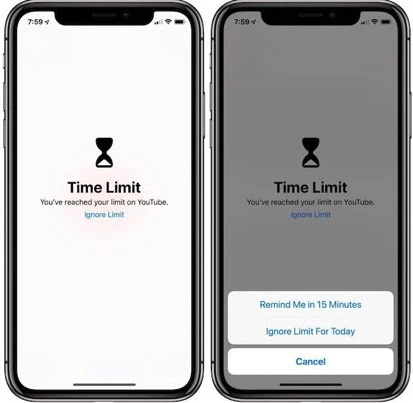
the catch you're the one holding the passcode. a lock you have the key to is a lock you will open. it works better when someone else sets the code. without a passcode it's one tap, and for most people that's the whole story.
screenzen
- price free. no subscription, optional tips
- platforms ios, android
- best for free limits on apps you'd happily lose
tap instagram and you get a countdown instead of the feed. you sit through it, then you decide. you can set a different delay for each app, five seconds for email, thirty for tiktok. it comes with stats on how many times you tried to open each app, and how many of those times you waited through the countdown and then walked away.
people sometimes call it an interrupter because of that countdown. it isn't one. the countdown is a toll on the way in, and once you reach your limit it closes you out like any other blocker. an interrupter is something that turns up while you're already deep in the feed and lets you carry on.
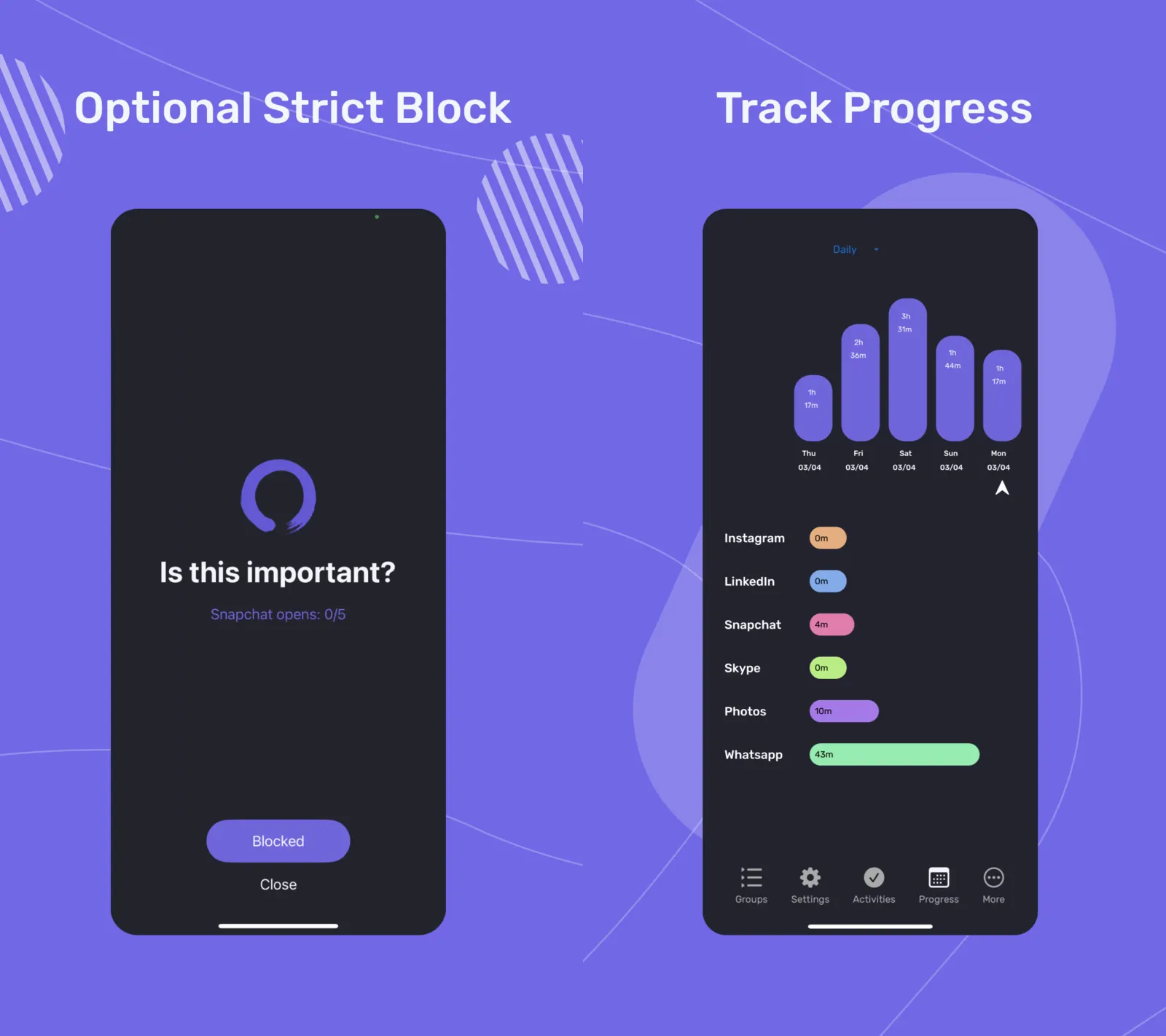
the catch the pause is in the wrong place for the problem i had. i don't lose time deciding to open linkedin, i lose it twenty minutes after i'm in. screenzen can't reach me there, and when the limit lands it takes the app away in the middle of work. so it ends up where every blocker ends up: in settings, switched off. for an app you'd genuinely be happy to lose it's the best free thing here and you should try it before paying anyone.
opal
- price free with basic timers and one rule. $19.99 a month or $99.99 a year
- platforms ios, android, mac
- best for someone who wants a hard block, enjoys a game alongside it, and will pay for polish
blocking sessions in three strengths. normal, which you can cancel any time. timeout, where the delays get longer each time you try to break out. and deep focus, which has no early exit at all. that last one genuinely works and it's the strongest software block here.
then there's the other half of the app. you earn gems for completing sessions, twenty one of them to collect plus seasonal ones. there's an opal score. there are leaderboards. there are co-working sessions.
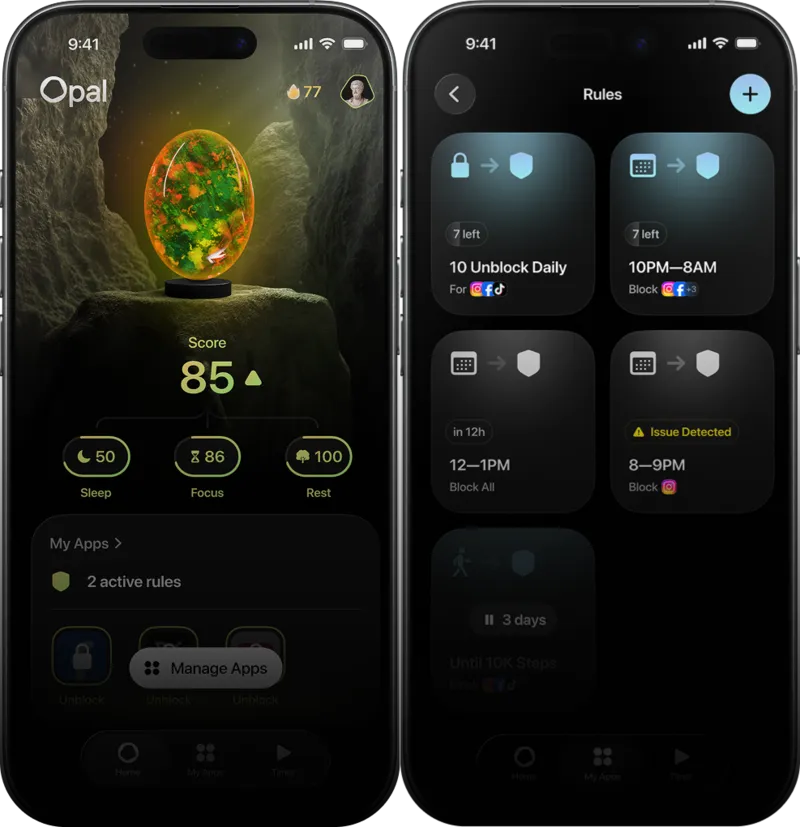
the catch two. the price, $99.99 a year, is the most expensive thing on this list by a wide margin, and it's rent, you never stop paying it. and the game, which i come back to below.
unrot
- price $9.99 a month or $34.99 a year
- platforms ios
- best for someone who wants their screen time tied to a real habit, and is somewhere they can do that habit
this one works differently to everything else here. you don't get screen time, you earn it. you complete a habit, either a timed one, a focus session, or a photo habit where you photograph the proof, a workout, a meal, journaling. that earns coins. you spend the coins to unlock instagram, tiktok, youtube, whatever you picked. no coins, no access. there's also a buddy that grows when you do your habits and loses energy when you scroll, plus streaks and a sleep schedule.
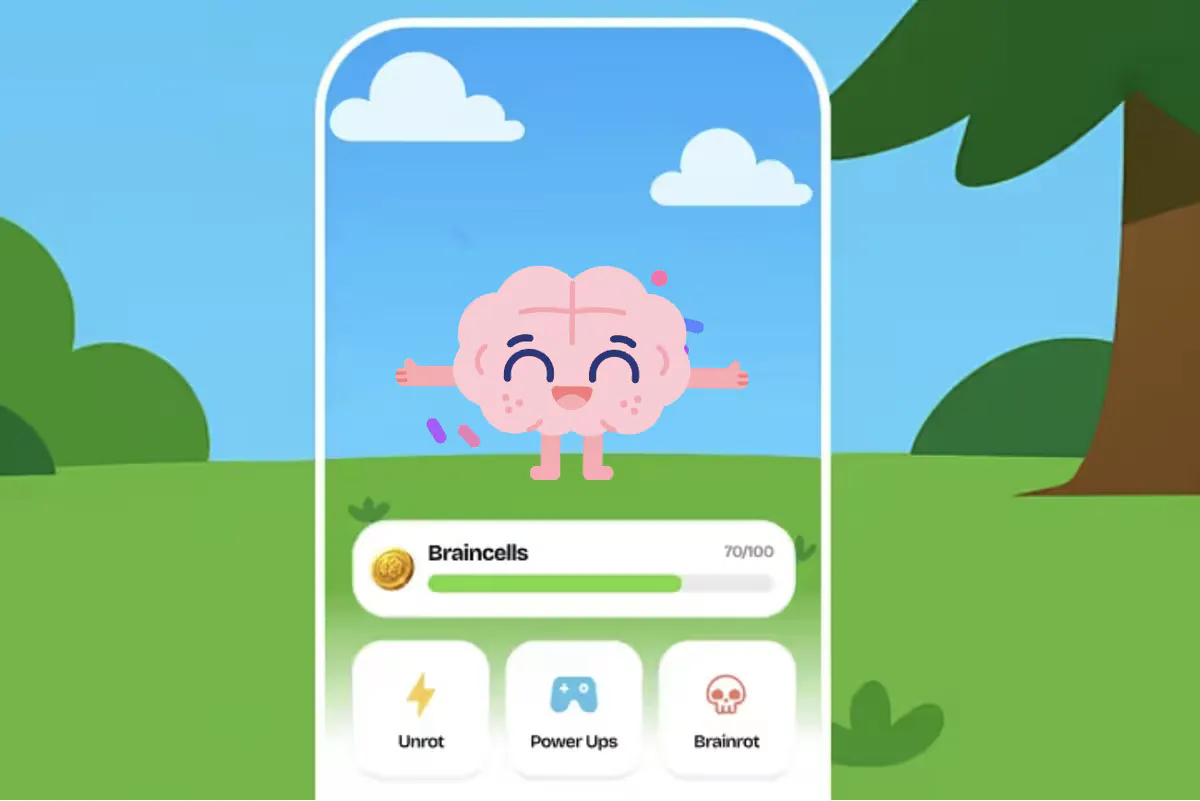
the catch it assumes you're somewhere you can perform, and that's the whole problem. you're at your desk, a colleague sends you something on linkedin, and the app wants a habit with photo proof before it lets you in. you're not going to work out next to your colleagues to earn a few minutes on linkedin. you're not going to stand there weighing it up either. you'll turn it off. it demos beautifully and it breaks in exactly the situation where you most needed it to hold.
freedom
- price free tier with two-hour sessions, then $8.99 a month, $39.99 a year, or $199 once
- platforms ios, android, mac, windows, chromebook
- best for the laptop problem. opal reaches mac too, but nothing else here goes near it
it runs a local vpn on your device. while a session is active, any request to something on your blocklist gets dropped. you can schedule recurring sessions, so instagram is gone every weekday from 7 to 9 without you doing anything. and locked mode stops you ending a session early or editing your blocklists, which is the only honest answer on this list to "i'll just switch it off".
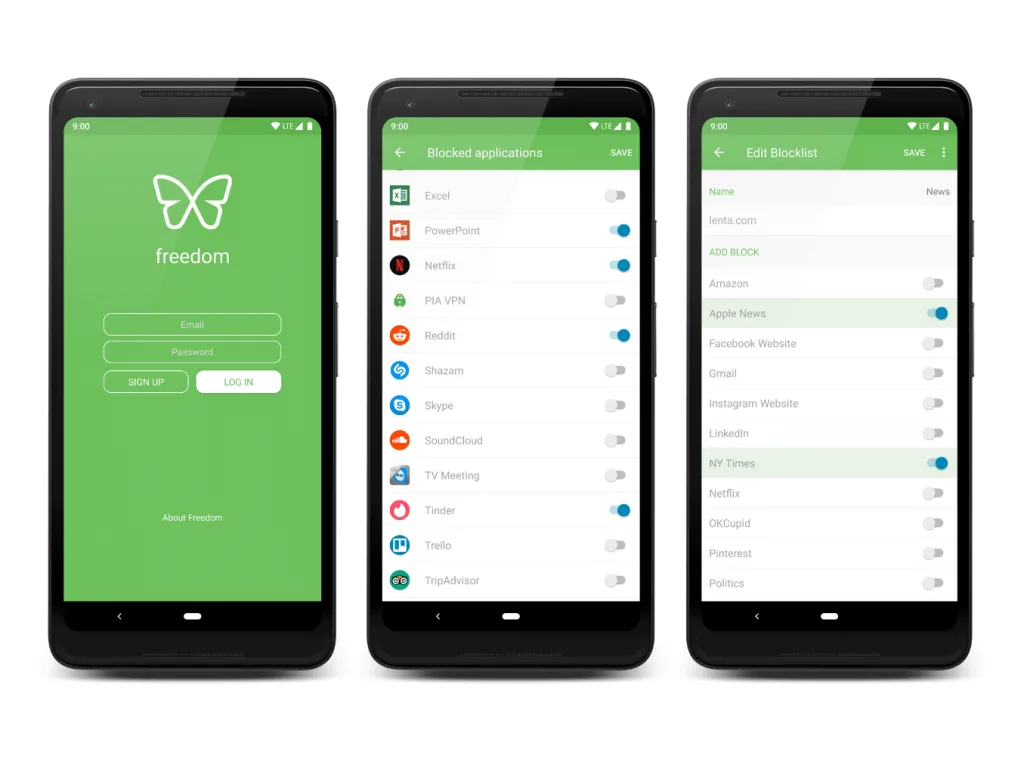
the catch the free tier caps sessions at two hours with no scheduling and no locked mode, so the version that actually helps is the paid one. $199 up front for forever is a lot of money to look at your screen less. and it's still a full block, so the work apps problem doesn't go anywhere.
brick
- price $59 once, no subscription, physical object included
- platforms ios and android
- best for someone who has already beaten every software block there is
a small plastic tag with an nfc chip in it. no battery, nothing to charge. you tap your phone against it to start a block, and to get back in you have to physically walk to it and tap again. on iphone the app drives ios screen time underneath. cheating means going to another room, which is exactly why it works.
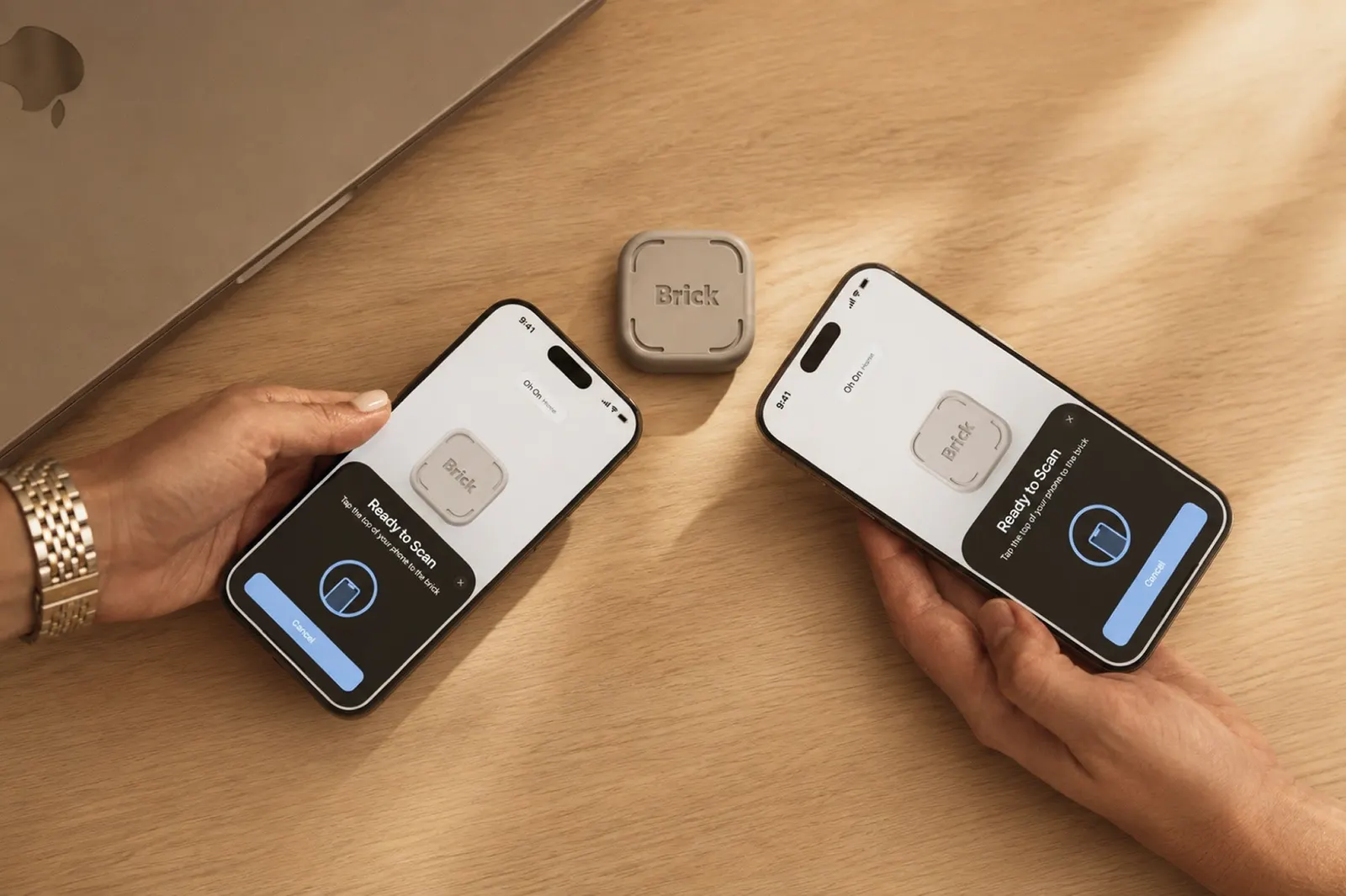
the catch more than you'd expect for something this simple.
- five emergency unbricks, and that's a hard limit. after that you email support. reviewers admit to burning one not on an emergency, but because they didn't feel like walking over.
- it needs an internet connection. no signal means you can neither brick nor unbrick.
- no timed unlocks. once you're unbricked you stay unbricked until you go back and tap it again, or until your next scheduled block starts.
- the nfc scan is temperamental and often takes a few taps.
- website blocking doesn't work on android, and on ios links from inside other apps can slip past it.
- and it's still a block. brilliant for an app you never need, wrong for one you need at work.
the odd one out
forest
- price free to use. $35.99 a year for forest plus
- platforms ios, android
- best for timed focus sessions at a desk
you plant a virtual seedling, set a timer and put the phone down. stay off it and the seedling grows into a tree. pick the phone up and it dies. it's pomodoro with a consequence attached. finishing sessions earns leaf coins, which buy new tree species and soundscapes, or go toward planting a real one, 2,500 coins per contribution and five contributions per tree, through a partner charity. people using forest have funded over two million real trees, and that part is genuinely good.
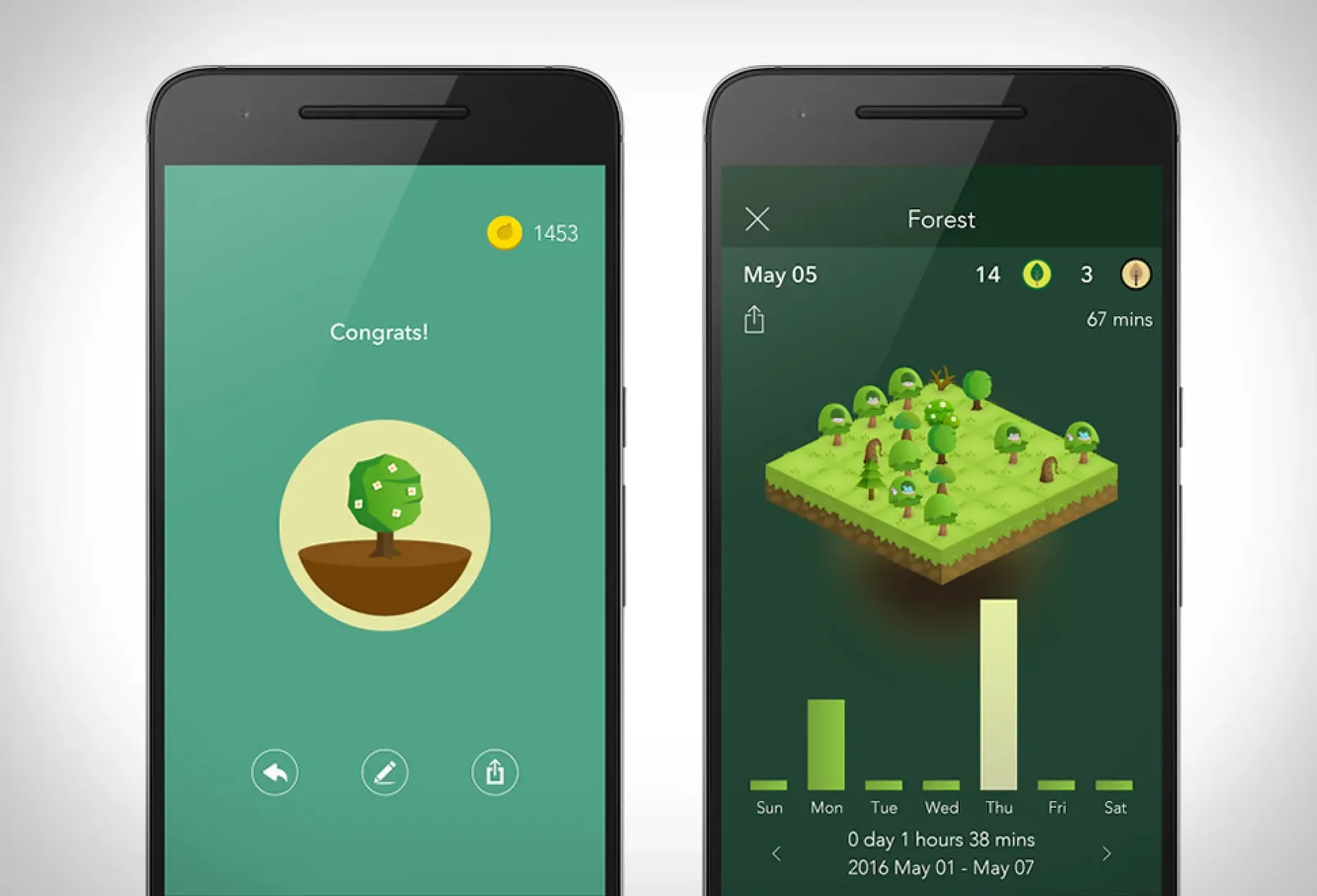
the catch it only runs during a session you deliberately started. the scrolling that costs you hours is the scrolling you never decided to do, at 11pm, in a queue, in the gap between two tasks. forest isn't there for any of it.
one factual note, because nearly every roundup online gets this wrong including the ones ranking above this page: forest used to be a $3.99 one-time purchase. it isn't any more. it has a free tier with a subscription on top.
the gamification problem
four of the ten apps here run on a game loop. opal has gems, a score and a leaderboard. unrot has coins, forest has coins and trees, and clearspace has streaks and challenges.
it's worth saying plainly why that bothers me.
the reason you can't put instagram down is a variable reward. you pull, you don't know what you'll get, sometimes it's good, so you pull again. the uncertainty is the hook, and it's engineered on purpose by people who are very good at it.
so an app whose entire job is to get you off that loop, which then builds you another loop, has a problem. you're not scrolling less because you decided to. you're scrolling less because there's a streak you don't want to break and a gem you need to finish the set. and the day the game stops being interesting, and it will, there's nothing underneath it.
it also quietly gives the app a reason to want you inside it. every collection you're building is time spent in your screen time app.
i'm not saying it doesn't work. streaks work, that's the entire point of streaks. i'm saying they work the same way the thing you're escaping works. if that trade is fine with you, opal and forest are both very well made and you'll enjoy them. it wasn't fine with me, and that, plus not wanting a fourth subscription, is most of why i went and built something with nothing in it to collect.
how to pick
four questions.
do you need the app for work, or for people you care about? if no, block it, and stop reading here. ios screen time first because it's free and it's already there. screenzen if you want better stats. brick if you've already broken every software block you've tried.
do you scroll on a laptop too? if yes, freedom and opal are the only ones here that treat the phone and the laptop as one problem.
do you want a game with it? if you like streaks and collecting things, opal is the most polished and forest is the most charming. if that idea makes you uneasy, read the section above and then avoid all four.
otherwise you want an interrupter. one sec if you're on android or desktop, with extra friction and more features. clearspace if you like a breath on the way in, with challenges on top. kokopi if you're on ios and you want the interruption on its own, without a subscription or a game attached.
one honest note to finish. none of these is a fix on its own. i still keep a few plain rules. phone out of sight until noon. never in bed. no screen an hour before sleep. grayscale in the evening. the app catches the scrolling you didn't decide to do. the rules handle the rest.
faq
do app blockers actually work? for apps you never need, yes, and a hard block is the right tool. for apps you use every day they mostly don't, because the block itself becomes the problem and you switch it off. that's the failure mode almost everyone reports.
what's the difference between blocking and interrupting? blocking takes the app away. interrupting leaves the app there and asks you a question while you're already in it. one relies on you not being able to get in. the other relies on you noticing you're already there.
is there research on this? some. the clearest is a 2023 PNAS study that found an interruption cut app opens by around 57%. worth knowing it measured opens rather than hours, and the effect shrank over the weeks of the study.
is ios screen time enough on its own? for some people yes, and it's free, so it's the right thing to try first. for most people the ignore button is too easy, unless you set a passcode and enable "block at end of limit". that's the point where a dedicated app starts to be worth paying for.
why do so many of these apps have streaks and points? because streaks keep people using the app, and an app that keeps people using it grows. the awkward part is that the habit you're trying to break was built with the same technique. it's worth deciding whether you're fine with that before you commit to one.
more on how kokopi works, pricing and privacy in the kokopi faq.